 United States
How to Read Your Vape Screen: Watts, Ohms, Volts, and Indicators Explained
This guide is intended for adult users of legal purchasing age. Vape screens, displayed values, operating modes, and indicators vary by manufacturer and device. Always follow the manual and operating specifications provided for your exact device.
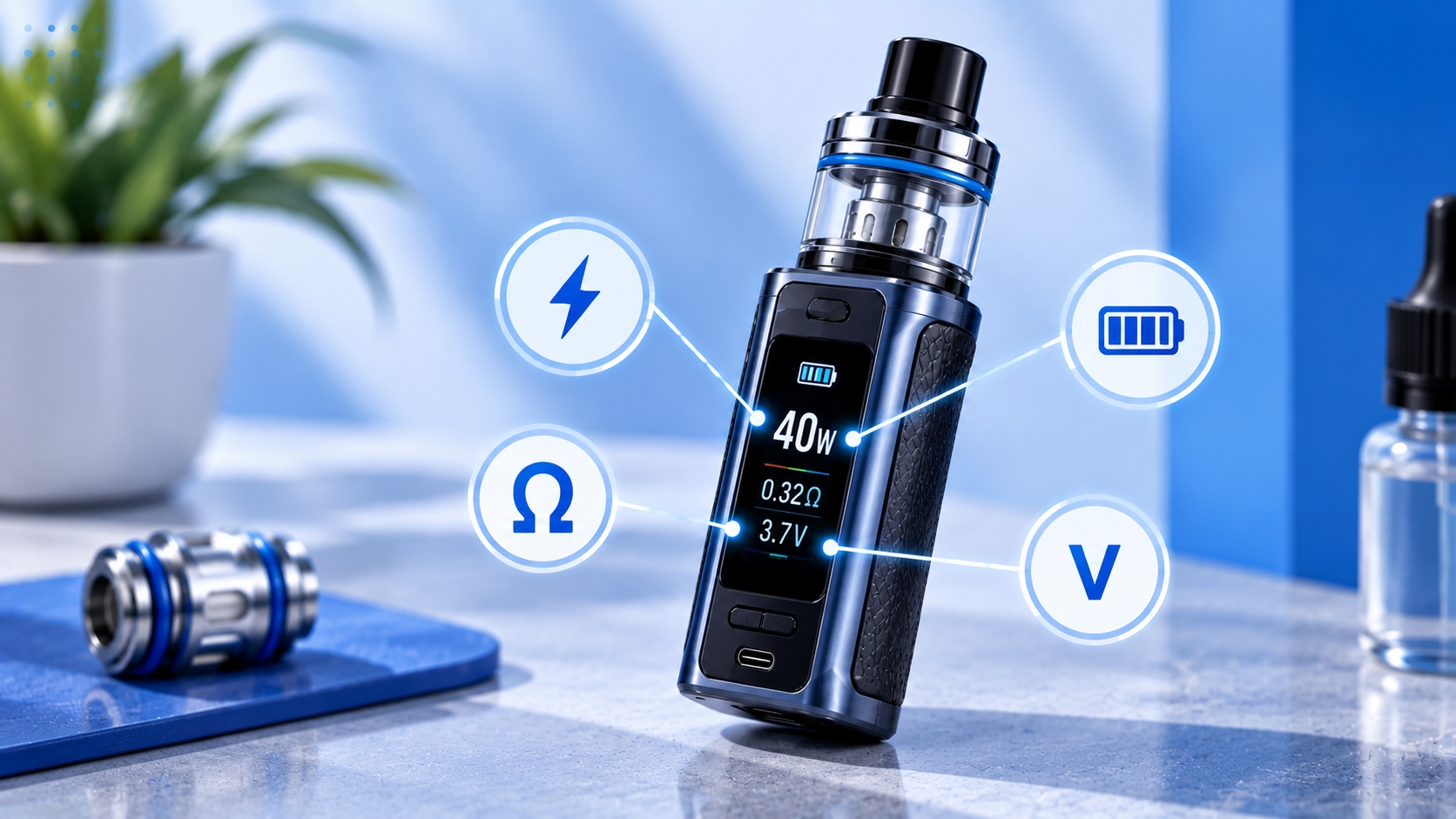
A vape screen can show much more than battery life. Depending on the device, you might see watts, ohms, volts, puff counts, timers, operating modes, lock symbols, and other indicators every time you use it.
Understanding these readings makes it easier to know what your device is displaying without treating every changing number or symbol as a problem.
This guide explains the most common vape screen readings, what they represent, and why some values may change during normal use.
What Information Does a Vape Screen Show?
The exact screen layout depends on the device. Simple pod systems may display only battery level and power, while more advanced devices can show several operating values at once.
Common vape screen information includes:
- Wattage (W)
- Coil resistance (Ω)
- Voltage (V)
- Battery level
- Puff count
- Puff duration
- Operating mode
- Lock status
- Device-specific indicators or warnings
Not every device displays all of these values, and manufacturers may use different icons or abbreviations for similar functions.
Watts (W): Your Device's Power Setting
The number followed by W represents watts, a measure of electrical power. On devices with adjustable wattage, this is one of the main settings you can control.
For example, if the screen displays 25W, the device is set to operate at 25 watts when firing, subject to the device's control system and operating limits.
Different coils are designed for different operating ranges, so the highest wattage available on the device is not automatically the correct setting for every coil. The recommended range printed on the coil, packaging, or manufacturer specifications is the more useful reference.
If you're choosing a coil for an adjustable device, Vape.com's vape coil guide explains how resistance and recommended power ranges relate to coil selection.
Ohms (Ω): The Resistance of the Coil
The value followed by the Ω symbol represents electrical resistance, measured in ohms. Your device reads this value from the installed coil.
You might see values such as:
- 0.2Ω
- 0.4Ω
- 0.6Ω
- 0.8Ω
- 1.0Ω
Resistance is one of the electrical characteristics that affects how a device and coil operate together, but it should not be used by itself to determine compatibility or an appropriate wattage.
For readers who want to understand the electrical relationship in more detail, Vape.com's Ohm's Law guide covers resistance, voltage, current, and power separately.
Volts (V): The Voltage Being Applied
A value followed by V represents voltage. Depending on the device, voltage may appear as an adjustable setting, a calculated value, or a reading displayed while the device is firing.
On regulated devices, wattage, resistance, voltage, and current are related electrically, while the device's chipset manages output according to its design and selected settings.
You generally do not need to manually calculate these relationships simply to read the screen. The important point is recognizing that W, Ω, and V represent different electrical measurements rather than three versions of the same setting.
Battery Indicator: How Much Charge Is Left?
Most vape screens include a battery icon or percentage showing the approximate remaining charge.
Depending on the device, battery information may appear as:
- A battery-shaped icon
- A percentage
- Bars inside a battery symbol
- Separate indicators for multiple batteries
Treat the display as a device estimate rather than assuming it is a laboratory-precise measurement of remaining runtime. Battery behavior and charging requirements vary by device.
Charging, battery handling, and battery condition involve separate considerations covered in Vape.com's battery safety guide.
Puff Counter: What Does It Measure?
A puff counter records the number of activations or draws recognized by the device according to its programming.
It can be useful for observing usage patterns, but it should not be interpreted as an exact measurement of how much e-liquid has been consumed or how much coil life remains.
Two puffs can differ significantly in duration, power, and airflow, so the same puff count does not necessarily represent the same amount of device use.
Some devices automatically reset their counters under certain conditions, while others allow the counter to be manually cleared. Check the device manual before assuming a reset indicates a malfunction.
Puff Duration: What Does the Timer Mean?
Some screens briefly display a timer after each activation. This normally represents how long the device was firing during that particular puff.
For example, a display of 2.4s generally indicates an activation lasting approximately 2.4 seconds.
This timer is different from the puff counter: one records duration, while the other records the number of recognized activations.
What Does the Mode Indicator Mean?
Some vape screens display the operating mode currently selected. The terminology varies significantly between manufacturers and models.
Depending on the device, you might encounter labels such as:
- VW or Power: Variable-wattage operation
- Smart: A manufacturer-defined mode that may automatically recommend or limit settings based on the detected coil
- TC: Temperature-control mode on supported devices and coil materials
- Bypass: A device-specific mode designed to provide a different style of regulated output
- Boost, Pulse, or similar labels: Manufacturer-specific output modes whose behavior depends on the device
Names alone do not guarantee that two manufacturers implement a mode in exactly the same way. The manual for your specific model is the best source for understanding what each mode actually changes.
What Does a Lock Symbol Mean?
A padlock symbol usually indicates that some part of the device's controls has been locked to help prevent accidental changes.
Depending on the model, the lock may disable adjustment buttons, prevent wattage changes, lock the firing function, or control a combination of these features.
Because lock behavior varies, use the device manual for the correct button combination and to confirm exactly which controls are affected.
Why Can the Ohm Reading Change Slightly?
A displayed resistance value may sometimes differ slightly from the nominal resistance printed on the coil. For example, a coil labeled 0.8Ω may not always appear as exactly 0.80Ω on every device.
Small differences can occur because the printed value is nominal and the device is measuring the installed coil and connection. The manufacturer's specifications and device manual should be used to determine what readings are expected for the particular hardware.
A large, persistent, or unusual change is different from simply understanding the screen reading and may require device-specific troubleshooting rather than assuming the display itself is inaccurate.
What Do Warning Messages on a Vape Screen Mean?
Regulated devices can display warnings when their control system detects a condition that requires attention. The wording depends on the manufacturer.
Examples may include messages related to coil detection, battery level, temperature, resistance, charging, or activation limits.
A warning should be interpreted according to the exact device manual rather than relying only on wording used by another brand. For example, an atomizer-detection message has its own causes and troubleshooting process, which Vape.com's No Atomizer guide covers separately.
Quick Guide to Common Vape Screen Readings
| Display | Usually Represents | What It Tells You |
|---|---|---|
| W | Watts | Power setting or output |
| Ω | Ohms | Detected coil resistance |
| V | Volts | Voltage value shown by the device |
| Battery Icon | Battery status | Approximate remaining charge |
| Puff | Puff counter | Number of recognized activations |
| s | Seconds | Duration of an activation |
| Lock Icon | Control lock | Indicates locked functions according to the device |
| Mode Label | Operating mode | Shows the currently selected device mode |
Not Every Vape Screen Works the Same Way
The most important thing to remember is that vape screen layouts are not standardized. Two devices can display similar information using different icons, abbreviations, menus, or terminology.
Even familiar labels such as Smart, Boost, Pulse, or Lock can behave differently depending on the chipset and manufacturer.
Use general guides to understand what common measurements mean, but use the manufacturer's current manual when you need to know what a specific symbol, mode, menu option, or warning means on your exact device.
Bottom Line
Reading a vape screen becomes much easier once you separate the main values. Watts relate to power, ohms describe coil resistance, and volts represent voltage. Battery indicators estimate remaining charge, while puff counters, timers, modes, and lock symbols provide additional information about device operation.
You do not need to treat every number as something that must be adjusted. Start by identifying what each reading represents, stay within the specifications for the installed hardware, and use the manual for device-specific indicators and controls.
Screen layouts, warning messages, operating modes, and supported settings vary by manufacturer and model. Always follow the current manufacturer manual and specifications for your exact device, particularly when the screen displays an unfamiliar warning or unexpected value.