 United States
Why Is My Vape Screen Not Turning Off? Display Timeout and Sleep Mode Explained
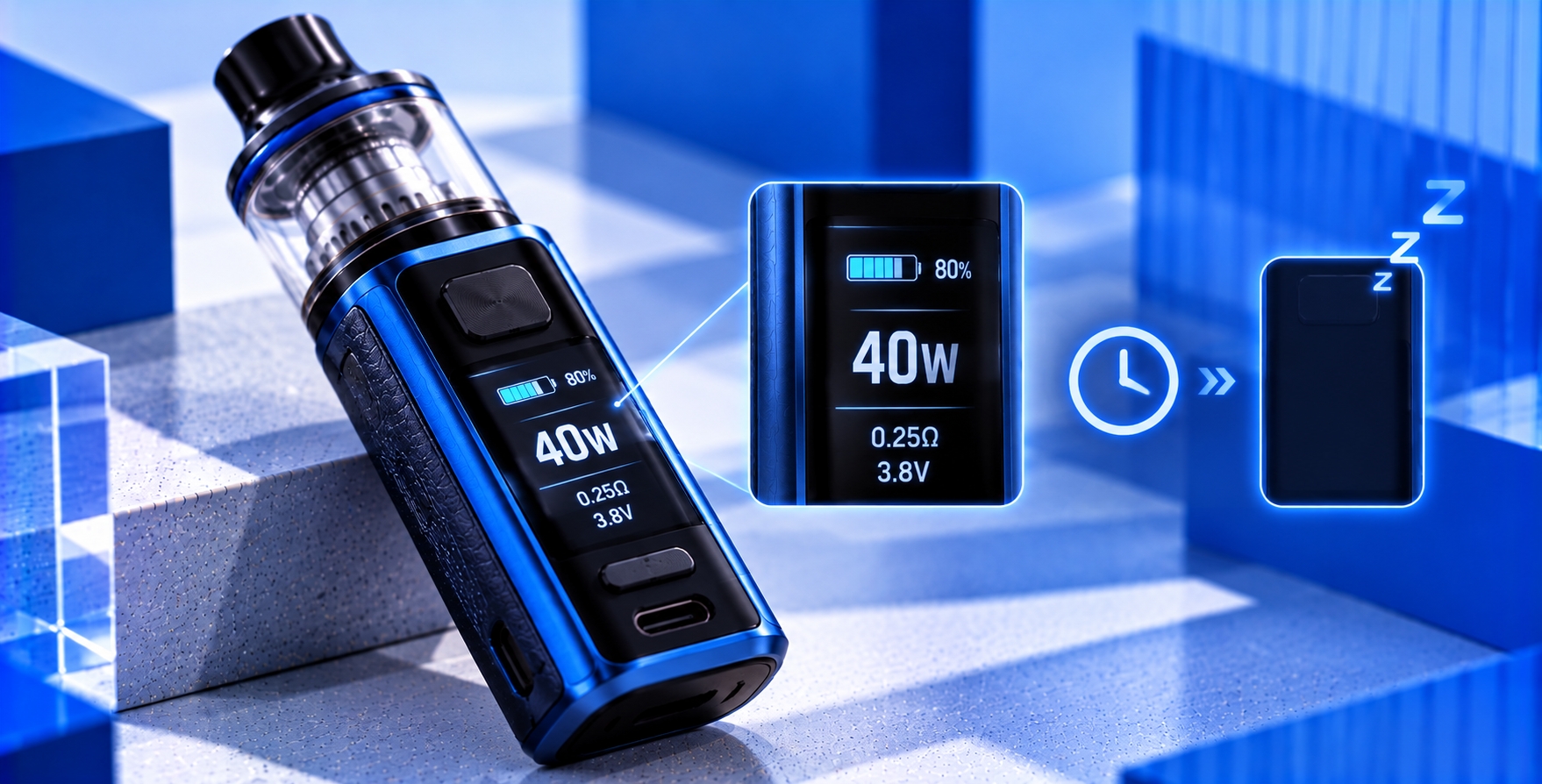
You finish using your vape, set it down, and notice that the screen is still illuminated. Instead of dimming or switching off after a short period, the display continues showing the battery level, wattage, or other information. If your vape screen is not turning off, you may wonder whether it is a display setting or a sign of an electronic problem.
Many screen-equipped vape devices use display timeout and power-saving functions to manage how long their screens remain active. However, the behavior varies by model. Some displays remain illuminated longer than others, while certain devices support adjustable brightness, standby screens, or configurable timeout settings.
This guide explains why a vape screen may stay on, how display timeout differs from sleep mode, what can prevent a screen from switching off, and when the behavior may require manufacturer attention.
Quick Answer: Why Is My Vape Screen Staying On?
A vape screen may remain illuminated because of its display timeout settings, an always-on display feature, repeated wake-up signals, software behavior, or an electronic malfunction.
On some devices, the screen stays active for a manufacturer-defined period after the last button press or other interaction. Other models may display limited information while the device is in a low-power state.
If the screen remains on much longer than the manual specifies, repeatedly wakes without user input, or appears alongside other unusual behavior, the device may require further assessment.
How Vape Display Timeout Works
Display timeout is the period a device waits before dimming or turning off its screen after an interaction. The feature is intended to reduce unnecessary display activity and, on some devices, conserve battery power.
For example, pressing a control button may illuminate the display. After a period without further interaction, the screen may dim or switch off automatically.
The timeout period is determined by the device's design and settings. There is no universal timeout duration that applies to every vape.
What Can Reset the Display Timeout?
Depending on the device, certain events may restart the display timer or cause the screen to illuminate again.
- Pressing a supported control button.
- Activating a manufacturer-defined screen or menu function.
- Connecting or disconnecting a charger.
- Receiving a charging-status or battery warning update.
- Triggering a supported motion or wake function, if the device has one.
These behaviors are model-dependent. A device that repeatedly wakes without an apparent input should not automatically be considered normal.
Display Timeout vs. Sleep Mode vs. Power Off
Although these terms are sometimes used interchangeably, they can describe different operating states.
| Feature | What It Generally Means | Screen Behavior |
|---|---|---|
| Display timeout | The display stops illuminating after a defined period | Screen dims or turns black |
| Sleep or standby mode | The device enters a reduced-power operating state | May turn off, dim, or show limited information |
| Screen lock | Certain controls or settings are restricted | May remain illuminated or turn off normally |
| Power off | The device enters its manufacturer-defined off state | Usually off, apart from supported charging or status behavior |
A black screen does not necessarily mean the entire device is powered off. Similarly, a locked screen does not always mean the device cannot activate its heating element. Consult the manual for the exact model's control and safety functions.
Why Is My Vape Screen Not Turning Off?
1. The Display Timeout Is Set Longer Than Expected
Some devices allow users to adjust how long the screen remains illuminated after an interaction. If the timeout is set to a longer duration, the display may appear to stay on unnecessarily.
Other devices use fixed timeout periods that cannot be changed through the user interface.
Check the manufacturer's instructions to determine whether the display duration is configurable. Do not use undocumented button combinations or hidden service menus to modify device behavior.
2. The Device Has an Always-On or Standby Display Feature
Certain electronic devices support low-power displays that remain visible while the main interface is inactive. Whether a particular vape supports this feature depends entirely on its hardware and firmware.
A dim clock, battery indicator, or limited status display may therefore be intentional on a model designed to provide it.
Do not assume that an illuminated screen is an always-on display unless the official manual documents that function.
3. A Button Is Sticking or Sending Repeated Input
A control button that remains physically depressed or does not return to its normal position may repeatedly trigger a screen wake function.
Depending on the device, this may prevent the display timer from completing or cause the screen to turn on again shortly after switching off.
A sticking fire button is especially concerning because it may affect more than the display. If a button appears stuck, the device activates unexpectedly, or the heating element may be operating without intentional input, stop using it immediately.
Do not pry, lubricate, or disassemble the button mechanism. Contact the manufacturer for service guidance.
4. Charging Status Is Keeping the Screen Active
Some vape devices illuminate their displays during charging to show battery percentage, charging progress, or other status information.
The display may remain on continuously, illuminate periodically, or turn off after a manufacturer-defined interval. These patterns vary by device.
If the screen stays on only while connected to a charger, compare the behavior with the official charging instructions.
If charging is accompanied by unusual heat, repeated restarting, an abnormal odor, or battery warnings, disconnect the charger when safe and stop using the device.
5. Firmware or Software Is Not Managing the Display Correctly
On devices with firmware-controlled displays, software determines how the interface responds to inputs, updates information, and enters reduced-power states.
A software problem may interfere with display timing, cause repeated wake events, or leave the interface active longer than intended.
However, a screen that stays on does not prove that firmware is responsible. Hardware faults and normal manufacturer-defined behavior can produce similar symptoms.
Only install firmware updates officially provided for the exact device model. Do not use unofficial software, modified firmware, or undocumented procedures.
6. The Device Is Experiencing an Electronic Control Problem
The chipset and supporting electronics manage many functions in a regulated vape device, including display operation, input processing, and power control.
If an internal component malfunctions, the screen may remain illuminated, repeatedly restart, or behave inconsistently.
Vape.com's vape chipset guide explains the general role of electronic control systems in regulated devices.
Internal electrical problems should be assessed through manufacturer-authorized service rather than home repairs.
Why Does My Vape Screen Stay On After I Stop Using It?
A screen that remains illuminated briefly after the last interaction may be following its programmed timeout period.
If the display stays on much longer than expected, consider whether a supported standby feature, charging status, or repeated control input could be involved.
If the screen does not turn off within the time specified in the manual, or repeatedly illuminates without an apparent reason, discontinue use until the manufacturer can clarify the behavior.
Why Does My Vape Screen Keep Turning Back On?
A screen that turns off and then illuminates again is different from one that remains continuously on.
Repeated wake-ups may occur because of button inputs, charging-status updates, supported motion functions, or electronic control problems.
If the screen activates without intentional input, avoid repeatedly pressing buttons or attempting to reproduce the behavior. A persistent unexplained wake-up pattern should be reviewed by the manufacturer.
Can an Always-On Vape Screen Drain the Battery?
An illuminated display consumes electrical energy, although the amount depends on the screen technology, brightness, power-management design, and duration of operation.
If the screen remains active longer than intended, it may contribute to increased battery consumption. However, a screen that stays on does not necessarily explain all cases of rapid battery drain.
Battery aging, operating settings, electronic faults, and other factors can also affect battery runtime.
If your device's battery level behaves unexpectedly, consult the manufacturer's documentation before assuming that the screen is the only cause.
How to Check a Vape Screen That Will Not Turn Off
If the device is cool, undamaged, and not showing electrical warning signs, the following non-invasive checks may help distinguish normal display behavior from a malfunction.
- Stop using the device. Power it off using the manufacturer-defined procedure if it can be handled safely.
- Check for warning signs. Look for unusual heat, smoke, swelling, abnormal odors, damaged buttons, or unexpected activation. Stop troubleshooting if these occur.
- Review the official manual. Confirm the expected display timeout, sleep mode, charging display, and wake-up functions.
- Check supported display settings. If the manufacturer provides user-adjustable timeout or brightness settings, review them without modifying electrical protections.
- Inspect accessible buttons. Look for visible damage or a button that does not return normally. Do not force, pry, or dismantle the controls.
- Consider charging behavior. Determine whether the screen remains active only during a manufacturer-defined charging display. Do not continue charging a device with unexplained electrical symptoms.
- Contact manufacturer support. If the display remains on beyond documented behavior or repeatedly wakes without input, discontinue use and request assistance.
Do not open the housing, disconnect internal components, modify firmware protections, or attempt to repair a potentially faulty chipset.
Vape Screen Not Turning Off vs. Screen Flickering
These symptoms involve different aspects of display operation and should not automatically be treated as the same problem.
| Display Problem | Main Symptom | Primary Troubleshooting Focus |
|---|---|---|
| Screen not turning off | Display stays illuminated longer than expected | Timeout, sleep mode, repeated wake-up signals |
| Screen flickering | Display brightness or image changes irregularly | Display stability, power delivery, possible hardware faults |
| Screen not responding | Interface does not respond as expected | Input controls, software behavior, device state |
For general explanations of screen information, Vape.com's vape screen indicator guide covers the common readings and symbols shown on regulated devices.
When Is a Vape Screen That Stays On a Warning Sign?
A display that remains illuminated is not automatically dangerous, but certain accompanying symptoms can indicate a more serious problem.
- The device activates or heats without intentional input.
- The fire button appears stuck or damaged.
- The device becomes unusually hot while idle or charging.
- The screen repeatedly restarts or displays unexplained electrical warnings.
- The battery or enclosure shows swelling, leaking, or physical damage.
- The display problem begins after significant liquid exposure or impact.
- The device emits smoke, an abnormal odor, or unusual sounds.
If these warning signs appear, stop using and charging the device. A display problem occurring alongside abnormal heating or unexpected activation should not be treated as a simple screen setting issue.
Vape.com's device failure warning guide provides additional context on recognizing potentially serious operating problems.
Frequently Asked Questions
Why is my vape screen staying on all the time?
Possible explanations include a long display timeout, an always-on or standby feature, repeated button input, charging-status behavior, or an electronic malfunction. Consult the official manual to determine what is normal for the exact model.
How do I turn off my vape screen?
The procedure varies by device. Some models provide screen timeout settings, while others automatically turn off the display after a fixed period. Follow the manufacturer's instructions rather than using undocumented button combinations.
Does vape sleep mode turn off the entire device?
Not necessarily. Sleep mode generally refers to a reduced-power operating state, while full power-off may be a separate function. The distinction depends on the device's electronic design.
Why does my vape screen turn back on by itself?
Possible causes include supported wake-up functions, charging-status updates, repeated button signals, or an electronic control issue. If the screen repeatedly activates without an expected trigger, stop using the device and consult the manufacturer.
Can a vape screen that stays on drain the battery?
Yes. An illuminated display uses energy, so remaining active longer than intended may increase battery consumption. The effect depends on display brightness, screen technology, and the device's power-management system.
Is it dangerous if my vape screen will not turn off?
Not always. It may be normal display behavior or a settings issue. However, unexpected activation, unusual heat, battery damage, or other electrical symptoms require immediate discontinuation of use.
Should I reset my vape if the screen stays on?
Only follow reset procedures explicitly documented by the manufacturer for your exact device. Avoid unofficial reset methods, firmware modifications, or repeated button combinations intended to bypass protective functions.
Final Verdict
A vape screen that does not turn off may be following a long display timeout, showing a supported standby interface, or responding to repeated wake-up signals. In other cases, the behavior may indicate a problem with buttons, software, or internal electronics.
The key is to compare the display behavior with the manufacturer's documented settings and operating states. A screen that remains illuminated is not necessarily the same as a device that is actively heating.
If the display stays on beyond the manufacturer's expected behavior, repeatedly wakes without input, or appears alongside electrical warning signs, discontinue use and seek authorized support.
Sources & Further Reading
- U.S. Food and Drug Administration — Vape Battery Safety Guidance
- Vaporesso — Official Product Manuals and Support
- Geekvape — Official Product Documentation
Last reviewed: October 31, 2026. This article provides general device-display troubleshooting and safety information for adults of legal purchasing age. Display timeout, sleep mode, button functions, and firmware behavior vary by manufacturer and model. Always consult the official instructions for your device.