 United States
Why Does My Vape Pod Keep Disconnecting? Contact Problems Explained
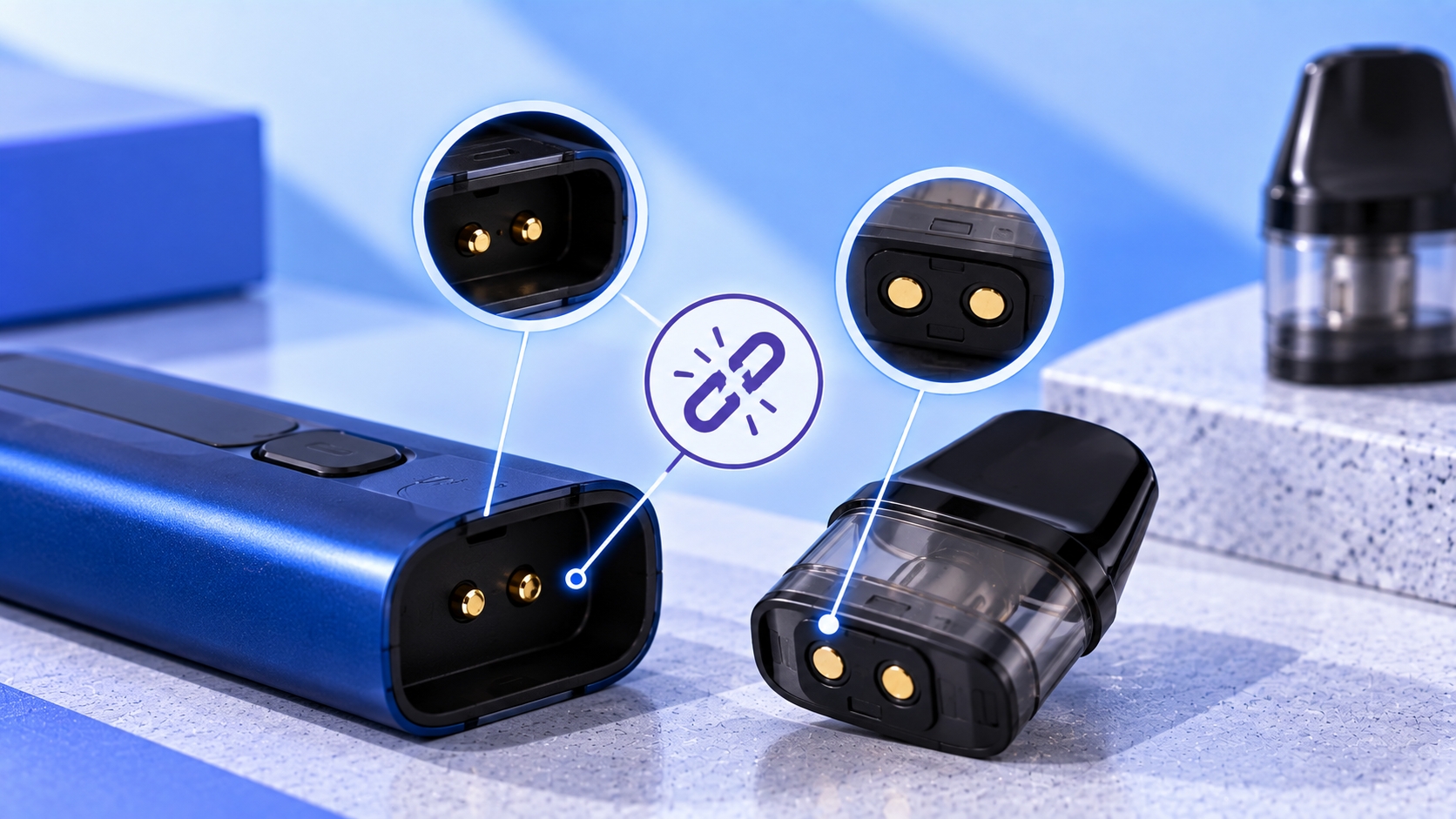
This guide is intended for adult users of legal purchasing age. Pod connection systems vary by manufacturer and model. If your device repeatedly loses contact with its pod, use the instructions for your exact device before adjusting, replacing, or cleaning components.
A pod that connects one moment and disconnects the next can make a vape behave unpredictably. The device may fail to activate, briefly recognize the pod, display a warning, or start working again after the cartridge is removed and reinserted.
In many cases, the problem is somewhere along the connection between the pod and the device. Moisture, residue, dirty contacts, incorrect pod installation, damaged contact points, or an incompatible cartridge can interfere with the electrical connection.
The key is determining whether the problem follows the pod, remains with the device, or comes from the contact surfaces between them.
How Does a Vape Pod Connect to the Device?
A pod system needs both a physical fit and an electrical connection. The cartridge sits in a pod bay or connection area, while conductive contact points allow the device to interact with the coil assembly.
Many pod systems also use magnets to help position and retain the cartridge. The magnets can help hold the pod in place, but electrical contact is still made through dedicated conductive points rather than the magnets alone.
Because connection designs are model-specific, cartridges that look almost identical are not automatically interchangeable. Correct pod compatibility depends on the exact device, cartridge series, coil system, and manufacturer specifications.
What Does a Pod Connection Problem Look Like?
An unstable pod connection does not always produce the same symptom. Depending on the device, you may notice:
- The device works intermittently
- The pod is recognized only after reinserting it
- An LED flashes when activation is attempted
- The screen reports that an atomizer or coil is not detected
- The displayed resistance disappears or changes unexpectedly
- The device stops activating even though the battery is charged
These symptoms can have causes beyond the pod connection itself, so they should be treated as clues rather than proof of a specific failure.
1. The Pod Isn't Fully Seated
Start with the simplest possibility: the pod may not be completely inserted into its connection area.
A cartridge that sits slightly out of position may not maintain consistent contact with the device. Remove the pod and reinstall it according to the manufacturer's instructions, making sure it sits in its normal position without forcing it.
If the pod repeatedly rises, tilts, or fails to remain in its intended position, inspect the cartridge and pod bay for visible damage or an obstruction.
2. E-Liquid or Condensation Is on the Contacts
Moisture can collect where the pod meets the device. This may come from condensation, small amounts of e-liquid, or a leaking cartridge.
If liquid reaches the contact area, it can interfere with a clean connection. With the device turned off when applicable and disconnected from charging, remove the pod and inspect accessible surfaces according to the manufacturer's cleaning instructions.
Persistent moisture should not simply be wiped away and ignored. If the cartridge repeatedly releases e-liquid into the connection area, a damaged seal or another leaking issue may be contributing to the repeated disconnections.
3. The Contact Points Are Dirty
Even when there is no obvious liquid, residue or debris can accumulate on accessible contact surfaces over time.
Dirty contacts can make it harder for the pod and device to maintain consistent electrical contact. Inspect the connection area under good lighting and follow the manufacturer's recommended cleaning procedure for the specific device.
Avoid scraping, bending, or aggressively cleaning electrical contacts. Small connection components can be damaged by excessive pressure or inappropriate tools.
4. A Contact Pin Isn't Moving Normally
Some pod devices use spring-loaded or movable contact pins. These are designed to maintain contact when a compatible pod is installed.
If an accessible contact appears stuck, uneven, recessed, corroded, or physically damaged compared with the others, the device may have difficulty maintaining a stable connection.
Do not pry a recessed contact upward or insert metal objects into the device. If cleaning the accessible area according to the manufacturer's instructions does not restore normal operation, the hardware may require replacement or manufacturer support.
5. The Pod Contacts Are Damaged
The cartridge itself also has connection surfaces. Wear, contamination, deformation, or other physical damage on the bottom of the pod can prevent consistent contact with the device.
If one compatible pod repeatedly disconnects while another known-compatible pod works normally in the same device, that difference can point toward the original cartridge rather than the device.
Visible damage to the cartridge body, fill seal, or electrical contact area can also be a reason the pod needs replacing instead of being repeatedly reinstalled.
6. The Pod or Coil Isn't Compatible
Physical fit does not guarantee electrical compatibility. A pod may slide into a device but still belong to another model, generation, or coil platform.
Some product families use cartridges that look very similar while differing in dimensions, contact arrangement, integrated-coil resistance, or supported device generation.
Before treating intermittent detection as a device failure, verify the exact model number printed on the device, packaging, pod, or manufacturer documentation and make sure the replacement cartridge is specifically listed as compatible.
7. A Replaceable Coil Isn't Fully Installed
Some pods contain built-in coils, while others accept separate replaceable coil heads. On compatible replaceable-coil systems, the coil can form part of the electrical path between the cartridge and device.
If connection problems begin immediately after changing the coil, confirm that the correct replacement coil is installed and seated exactly as specified for the pod.
Do not force a coil into a cartridge because it appears to fit. Coil families can differ in both physical and electrical compatibility.
8. The Device Is Reporting an Atomizer Connection Problem
On devices with screens, an unstable connection may appear as an atomizer-related warning instead of simply looking like a disconnected pod.
Messages such as “No Atomizer,” “Check Atomizer,” or similar manufacturer-specific wording can appear when the device cannot establish the expected electrical connection with the heating element. The same type of atomizer detection problem can involve the coil, contacts, connection, or compatibility rather than the cartridge body alone.
Screenless devices may communicate a comparable condition through an LED pattern. Because vape light meanings vary by model, the color and flash count should be matched to the manufacturer's documentation rather than interpreted as a universal code.
9. The Pod or Device Has Physical Damage
Drops, impact, heat, or normal wear can damage the pod bay, cartridge, magnets, contact surfaces, or surrounding housing.
A damaged connection area may allow the cartridge to move away from its normal contact position or prevent it from sitting correctly.
If the pod bay, contacts, battery housing, or cartridge is visibly damaged, stop using the affected component rather than trying to reshape, wedge, or modify it to restore the connection.
Pod Problem or Device Problem?
| What You Notice | What It May Point To |
|---|---|
| One pod disconnects but another compatible pod works | Original pod, coil, or pod contacts |
| Multiple compatible pods disconnect in the same device | Device-side contacts or pod bay |
| Connection returns after cleaning accessible contacts | Moisture, residue, or debris may have affected contact |
| Problem started after installing a new coil | Coil compatibility or installation |
| Liquid repeatedly collects in the pod bay | Possible cartridge or leaking issue |
| Contacts or housing are visibly damaged | Physical hardware damage |
How to Check a Vape Pod Connection
- Identify the exact device and pod. Confirm that the cartridge is specifically compatible with your model.
- Remove the pod. Turn the device off first when the model provides a power-off function.
- Inspect the pod bay. Look for visible e-liquid, condensation, debris, or physical damage.
- Inspect the pod contacts. Check accessible connection surfaces for residue or damage.
- Clean only as instructed. Follow the manufacturer's procedure and allow cleaned areas to be appropriately dry before reinstalling the pod.
- Reinstall the cartridge correctly. It should sit in its normal position without being forced.
- Observe the device response. Check whether the normal LED, screen, resistance reading, or activation behavior returns.
What Not to Do With Unstable Contacts
A connection problem can tempt you to physically manipulate the contacts until the device works again, but electrical connection components are not something to reshape casually.
Avoid inserting metal objects into the pod bay, prying contact pins upward, adding conductive material, wedging the cartridge into position, or modifying a pod to make it fit another device.
If a correctly identified compatible pod and properly installed coil cannot maintain contact after accessible areas have been inspected and cleaned according to the manufacturer instructions, replacing the affected component or contacting the manufacturer is safer than altering the connection.
When Does the Pod Need Replacing?
A disconnected pod does not automatically need to be replaced. If the issue comes from temporary moisture or incorrect installation, correcting that condition may restore normal contact.
Replacement becomes more relevant when the cartridge itself has damaged contacts, cracks, a failed seal, deformation, or another physical condition that prevents it from sitting and connecting normally.
If several known-compatible pods produce the same connection problem, however, repeatedly replacing cartridges is unlikely to address a fault located on the device side.
Bottom Line
A vape pod can repeatedly disconnect when the cartridge isn't fully seated, moisture or residue interferes with the contacts, a connection point is damaged, the coil is installed incorrectly, or the pod isn't actually compatible with the device.
The most useful clue is whether the problem follows one particular pod or continues across multiple compatible cartridges. That can help narrow the issue to the pod, coil, contact area, or device itself.
Keep the diagnosis focused on compatible components and manufacturer-approved inspection or cleaning methods. A persistent electrical connection problem should not be worked around by forcing the pod or modifying its contacts.
If the pod bay, electrical contacts, cartridge, or device housing appears damaged, stop using the affected hardware. Follow the manufacturer's instructions for your exact model rather than bending contacts, forcing components, or attempting electrical modifications.