 United States
How to Identify Your Vape Device Before Buying Replacement Parts
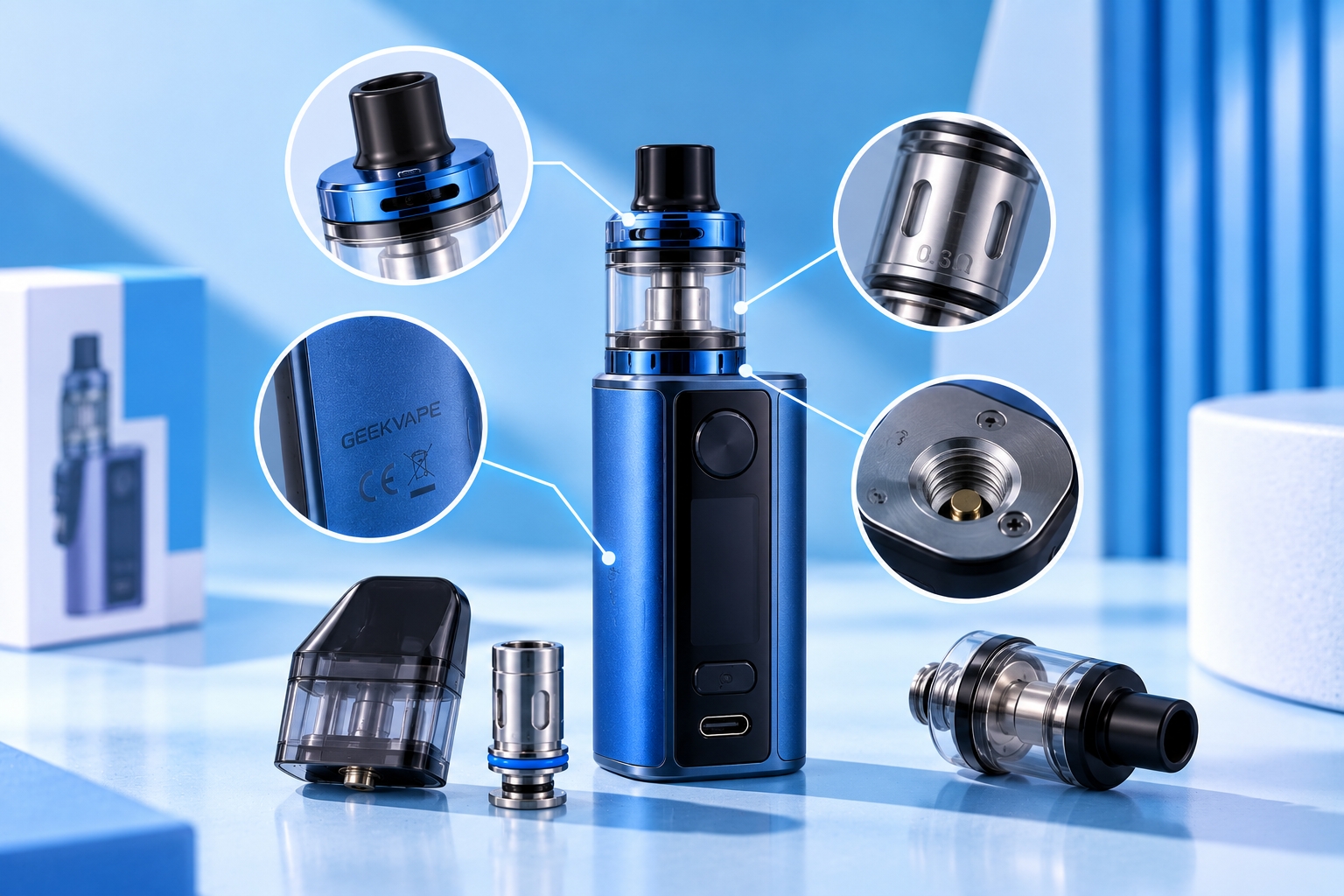
Vape model names, generations, and compatible replacement parts vary by manufacturer. Before purchasing a pod, coil, tank, or other component, identify the exact device model and verify the replacement part against the manufacturer's current specifications.
Knowing the brand of your vape is not always enough to identify the replacement parts it uses. A manufacturer may release several devices under the same product family, with differences such as generation numbers, Mini, Pro, Plus, Max, or other model-specific names.
Those differences can matter when you need a replacement pod, coil, tank, glass section, or another user-replaceable component. Two devices may look similar while using different hardware.
The first step is therefore not guessing which replacement part fits. It is identifying exactly which vape device you have.
Why the Exact Vape Model Matters
Replacement components are often designed around a specific device, product family, or hardware platform. Knowing only the manufacturer can leave several possible options.
For example, one manufacturer may offer multiple pod systems that use cartridges with similar shapes but different dimensions, contacts, magnets, coil systems, or resistance options. The complete model name helps narrow the search to components the manufacturer actually lists for that device.
Once the exact model is known, Vape.com's compatibility guide explains how to confirm whether a specific pod, coil, tank, or other replacement component is intended to work with it.
Check the Device Body for a Model Name
Start by inspecting the device itself. Manufacturers may print, engrave, or otherwise mark identifying information on the body.
Depending on the design, useful information may appear:
- On the front or back of the device
- Near the bottom
- Along one side
- Near the pod or tank connection
- On a manufacturer label
Look for the complete model name rather than stopping at the brand logo. A brand tells you who made the device; the model identifies which device you actually have.
Look for Generation Numbers and Model Suffixes
Small differences in a product name can be important when identifying replacement hardware.
Pay attention to identifiers such as generation or version numbers and terms such as Mini, Pro, Plus, Max, Nano, SE, or other manufacturer-specific suffixes.
Do not remove these terms when searching for replacement parts. A product-family name without its generation or suffix can point you toward components intended for a different version.
Check the Original Box or Packaging
If you still have the original packaging, it can be one of the easiest places to confirm the complete product name.
Look for the manufacturer name, exact model, kit name, included component information, and any model or version identifiers printed on the package.
If the device was originally sold as a kit, remember that the kit name and the names of individual included components may not always be identical. Record the device model separately from the tank, pod, or coil information when possible.
Find the Original Manual
The instruction manual normally identifies the product it was written for and can provide additional information about the hardware used with that model.
A manual can be especially useful when the device itself displays only limited identifying information. Check that the manual corresponds to the exact version you own, since manufacturers may publish different documentation for different generations or variants within the same product family.
Check Your Order or Purchase History
If the device was purchased online, your original order confirmation or account history may contain the product name that was listed when you bought it.
Copy the complete name rather than relying on memory. This can help distinguish between devices with similar branding or appearance. Because product listings can change over time, use this information as an identification clue and confirm it against current manufacturer documentation.
Check the Manufacturer's Official Product Information
Once you have a likely model name, compare it with the manufacturer's official product page, manual, or support documentation.
Useful details to compare can include the device's overall design, dimensions, controls, screen or LED arrangement, pod or tank style, charging port location, and officially listed components.
Manufacturer documentation should carry more weight than appearance alone because visual similarities do not establish that two devices are the same model.
Use the Pod or Tank as a Secondary Clue
If the device name is difficult to locate, an attached pod or tank can sometimes provide another clue.
Look for identifying markings on the cartridge, tank, or replaceable component, then compare those markings with manufacturer documentation.
However, treat this as supporting evidence rather than proof of the device model. Some pods, tanks, and coil families work with more than one device, while other components may have been replaced after the device was originally purchased.
If you're unsure which component you're looking at, understanding basic vape tank parts can make manufacturer diagrams and replacement-part descriptions easier to interpret.
Check the Existing Pod Before Buying Another One
Pod-system users should inspect the cartridge already installed in the device. Depending on the manufacturer, the pod may show a resistance value, product-family marking, or other identifying information.
That information can help narrow the possibilities, but similar resistance values do not prove that two pods are interchangeable.
Also determine whether the device uses a built-in coil cartridge or a pod with a separately replaceable coil. That distinction affects what component you actually need when performance begins to decline. Signs that the cartridge itself may need replacement are covered separately in the pod replacement guide.
Check the Existing Coil Carefully
If your device uses a removable pre-built coil, the old coil may contain markings such as its resistance or coil-family designation.
Record all available markings before disposing of the old component. They can help when comparing replacement options.
Do not buy a replacement based only on the ohm value. Two coils can have the same resistance while belonging to completely different hardware platforms. The exact coil family and manufacturer-listed compatibility matter more than a matching number alone.
Can You Identify a Vape Device by Appearance Alone?
Appearance can help narrow down possibilities, but it should not be the only identification method used before purchasing replacement hardware.
Closely related devices can share similar shapes, colors, button layouts, screens, and pod designs. Manufacturers may also update a product family while keeping a similar visual design.
Use appearance to compare possible models, then confirm the result using a model marking, packaging, purchase record, manual, or official manufacturer information.
Can the Screen Help Identify Your Vape?
A screen layout can sometimes help distinguish one device from another, particularly when models use different display arrangements or controls.
However, screen appearance should still be treated as a supporting clue rather than definitive identification. Chipsets and user interfaces can be shared across related products.
Once the model is confirmed, understanding its screen indicators can help distinguish model information from wattage, resistance, voltage, battery status, and other operating data.
Brand Name vs. Device Family vs. Exact Model
| Identifier | What It Tells You | Enough for Replacement Parts? |
|---|---|---|
| Brand | Who manufactured the device | Usually no |
| Product family | The broader device series | Sometimes, but verify exact model |
| Exact model | Specific device/version | Best starting point for verification |
| Component family | Pod, coil, tank, or part platform | Must still match the device's listed compatibility |
What If You Still Cannot Identify the Device?
If you cannot confidently determine the exact model, avoid ordering a replacement component based only on visual similarity.
Collect as much identifying information as possible, including the manufacturer, model markings, product-family name, generation or version, existing pod or coil markings, original packaging, manual, and order details.
Then compare those details with official manufacturer documentation. If the exact model remains uncertain, do not force a component into the device or assume that a similar-looking part is interchangeable.
What to Record Before Shopping for Replacement Parts
Once you've identified the device, record the complete model name exactly as the manufacturer presents it. If applicable, also record the generation, pod or tank name, coil family, and current resistance option.
This creates a much stronger starting point for compatibility checking than searching for a generic phrase such as “replacement coil for my vape.”
Identification tells you what device you own. Compatibility checking then determines which replacement parts are designed for it. Keeping those two steps separate reduces the chance of choosing a component simply because its appearance or specifications seem similar.
Final Thoughts
Before buying replacement vape hardware, identify the exact device rather than relying only on its brand or appearance. Check the model markings, full product name, generation, packaging, manual, purchase history, and manufacturer documentation.
Existing pods, tanks, and coils can provide additional clues, but they should support—not replace—confirmation of the device model.
Once the model is confirmed, use the manufacturer's current compatibility information to determine which replacement component is actually intended for that device.
Sources & Further Reading
Do not install or force a replacement component when the exact device or compatibility is uncertain. Product families, generations, and component systems can change over time, so verify the current manufacturer specifications for both the device and replacement part.